Subscription and Billing Guide
Everything you need to know about The Club Schedule subscription plans, billing, and managing your club's subscription.
Available Plans
The Club Schedule offers three flexible billing options:
| Plan | Price | Best For |
|---|---|---|
| Monthly | $12.50/month | Clubs wanting month-to-month flexibility |
| Semi-Annual | $59 (6 months) | Clubs planning ahead (saves $16/year vs monthly) |
| Yearly | $109 (12 months) | Clubs wanting the best value (saves $41/year vs monthly) |
All plans include: - Unlimited members - Unlimited schedules - Automated role assignment - Email notifications - Full access to all features - Email support
Free Trial
Every new club gets a 45-day free trial - no credit card required to start.
During your trial: - Full access to all features - No limitations on members or schedules - Test the system with your club - Cancel anytime before trial ends with no charge
How Billing Works
Starting Your Subscription
- At the end of your 45-day trial, you'll be prompted to choose a plan
- Enter your payment information (we use Stripe for secure payment processing)
- Your subscription begins immediately
- You'll receive an email confirmation with your receipt
Billing Cycle
- Your billing cycle starts when you first subscribe
- You're billed automatically at the beginning of each cycle
- Monthly plans bill every 30 days
- Semi-annual plans bill every 6 months
- Yearly plans bill every 12 months
Payment Methods
We accept: - Credit cards (Visa, Mastercard, American Express, Discover) - Debit cards - All payments are processed securely through Stripe
Managing Your Subscription
Changing Your Plan
To upgrade or downgrade your plan:
- Log in as a club officer
- Go to Club Settings > Billing & Subscription
- Click Change Plan
- Select your new plan
- Click Confirm Change
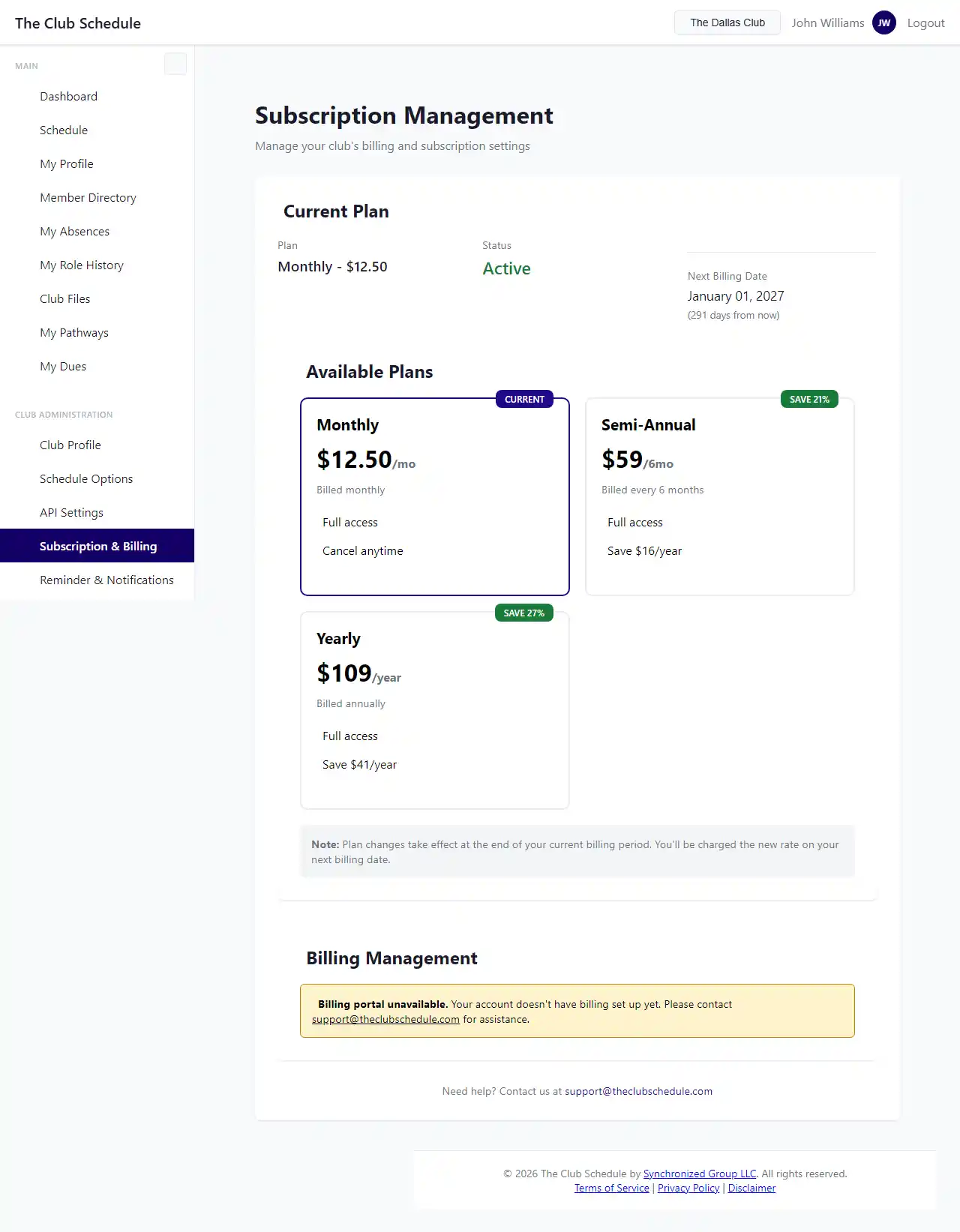
Important notes: - Upgrades take effect immediately (you're charged a prorated amount) - Downgrades take effect at the end of your current billing cycle - You can switch between any plans at any time
Updating Payment Information
- Go to Club Settings > Billing & Subscription
- Click Update Payment Method
- Enter your new card information
- Click Save
Viewing Billing History
To see past invoices and payments:
- Go to Club Settings > Billing & Subscription
- Scroll to the "Billing History" section
- Click on any invoice to download a PDF receipt
Canceling Your Subscription
We're sorry to see you go! To cancel:
- Go to Club Settings > Billing & Subscription
- Click Cancel Subscription
- Confirm your cancellation
What happens when you cancel: - Your subscription remains active until the end of your current billing cycle - You won't be charged again - After your paid period ends, your account enters read-only mode - Your data is preserved for 90 days in case you want to reactivate
Grace Period
If a payment fails, don't worry - you get a 5-day grace period:
- Full access to all features continues for 5 days
- We'll automatically retry your payment
- You'll receive email reminders to update your payment method
- Update your card before the grace period ends to avoid interruption
Lapsed Subscription
If your subscription remains unpaid after the grace period:
What You Can Still Do:
- View existing schedules (read-only)
- Access member information
- Export your data
- Update payment information to reactivate
What You Can't Do:
- Create new schedules
- Edit existing schedules
- Send more than 2 emails per week
- Add new members
- Modify role assignments
Reactivating Your Subscription
- Go to Club Settings > Billing & Subscription
- Click Reactivate Subscription
- Update your payment information if needed
- Choose your plan
- Your subscription resumes immediately with full access
Who Can Manage Billing
Any club officer can access billing settings: - President - VP Education - Secretary - Admin
Note: Even when a subscription is lapsed, officers can still access billing settings to reactivate.
Receipts and Invoices
You'll receive an email receipt for every payment. To download receipts:
- Check your email for receipts from The Club Schedule
- Or visit Billing & Subscription and click on any invoice in your billing history
- Click Download PDF to save a copy
Receipts include all information needed for expense reimbursement or tax purposes.
Tips
- Annual plans save money - If you're committed to using the service, yearly billing offers the best value
- Set calendar reminders - Mark your billing date so there are no surprises
- Keep payment info current - Expired cards are the most common cause of payment failures
- Multiple officers - Make sure at least two officers know how to access billing
- Download receipts - Keep copies for your club's financial records
Troubleshooting
My payment failed - what do I do? 1. Check that your card hasn't expired 2. Verify your billing address is correct 3. Contact your bank to ensure they're not blocking the charge 4. Update your payment method in billing settings 5. Contact our support if the problem continues
I was charged but don't see active subscription - Check your email for the payment confirmation - Log out and log back in - If the issue persists, contact support with your invoice number
I want a refund - Contact our support team at support@theclubschedule.com - Include your club name and invoice number - We handle refund requests on a case-by-case basis
Can I get a discount for multiple clubs? - Each club requires a separate subscription - Contact us if you manage multiple clubs - we may be able to arrange special pricing
Do you offer nonprofit discounts? - Contact us at support@theclubschedule.com to discuss nonprofit pricing options
Need Help?
If you have billing questions or issues:
- Email: support@theclubschedule.com
- Include your club name and subscription details
- We typically respond within 1 business day