Managing Your Profile
Update your personal information, contact details, and preferences from your profile page.
Before You Begin
- You need to be logged in to The Club Schedule.
- Your email address cannot be changed from the profile page. If you need to update your email, contact a club officer.
Accessing Your Profile
- Log in to The Club Schedule.
- Click your name or profile link in the sidebar navigation.
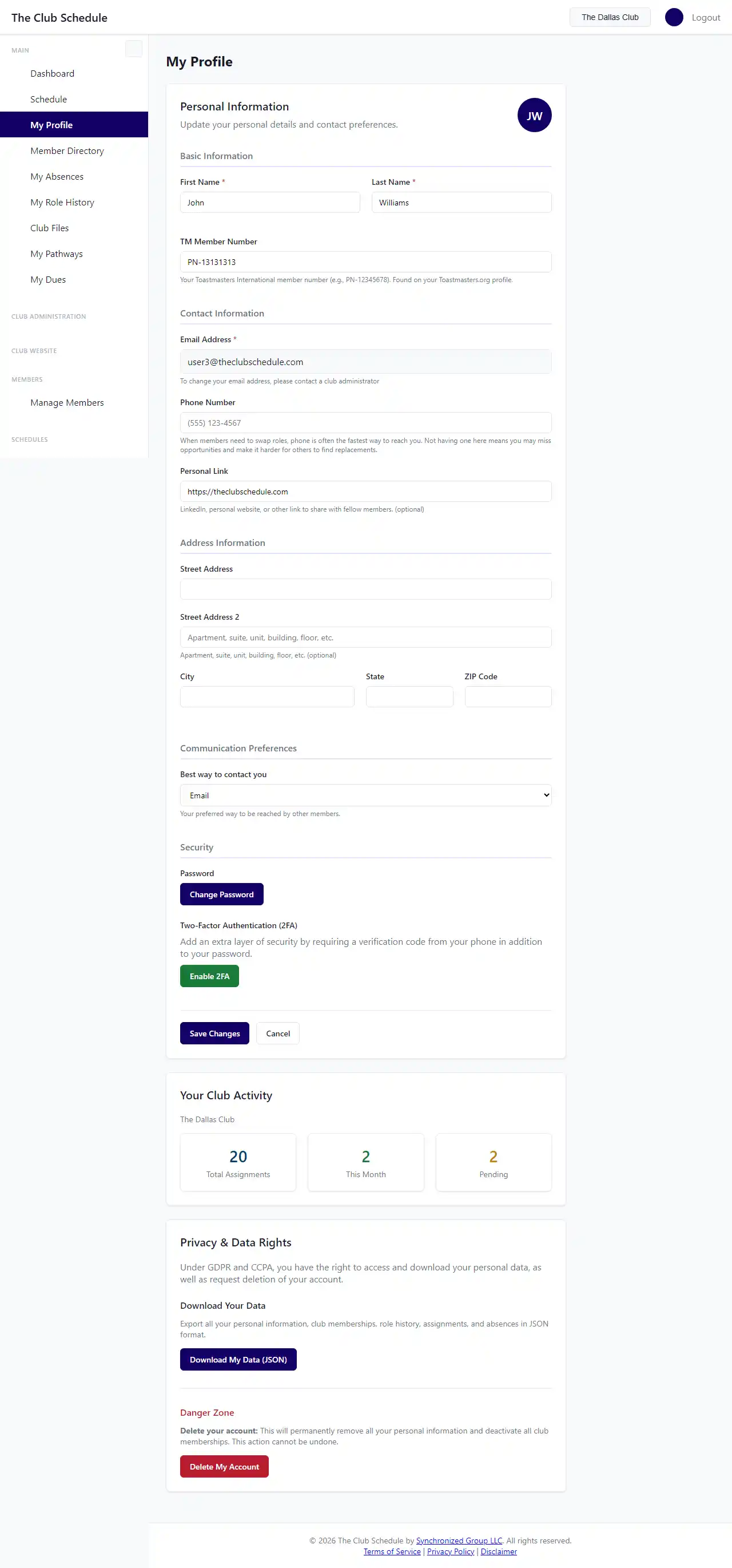
- The profile page displays your current information and a form to make changes.
Updating Your Personal Information
- On the profile page, locate the field you want to update:
- First Name
- Last Name
- TM Member Number -- Your Toastmasters International member number (format: PN-12345678)
- Phone Number
- Personal URL -- A link to your LinkedIn profile or personal website
- Edit the field with your updated information.
- Click Save to apply your changes.
- A success message confirms your profile has been updated.
Updating Your Mailing Address
Your mailing address is stored with your account and may be used by club officers for club correspondence.
- On the profile page, update any of the following fields:
- Street Address
- Street Address Line 2 -- Apartment, suite, or unit number
- City
- State
- ZIP Code
- Click Save to apply your changes.
Setting Your Contact Preference
You can choose how your club officers should contact you outside of the platform.
- Find the Preferred Contact Method dropdown on the profile page.
- Select your preferred method.
- Click Save.
Viewing Your Activity Stats
If you have an active club selected, the profile page shows a summary of your club activity:
- Total assignments -- The total number of roles you have been assigned across all time.
- This month -- How many role assignments you have in the current month.
- Pending -- How many upcoming assignments are still waiting for your response.
Changing Your Password
To change your password, use the password reset flow:
- Log out of your account.
- On the login page, click Forgot your password?
- Enter your email address and submit the form.
- Check your email for a password reset link.
- Click the link and set your new password.
Two-Factor Authentication (MFA)
Your profile page shows whether two-factor authentication is enabled for your account. For instructions on setting up or managing MFA, see the dedicated guide.
Tips
- Your TM Member Number must start with "PN-" followed by your numeric ID. This is the format used by Toastmasters International.
- Your email address is managed by club officers, not from this page. This prevents accidental lockouts and ensures your club has accurate contact information on file.
- Personal URL is a good place to put your LinkedIn profile so fellow club members can connect with you.
Troubleshooting
| Problem | Solution |
|---|---|
| I cannot change my email address | Contact a club officer to update your email through the member management page. |
| My activity stats are not showing | Make sure you have an active club selected. If you belong to multiple clubs, select one from the club selection page. |
| My TM Member Number is rejected | Ensure it follows the "PN-12345678" format. The prefix "PN-" is required. |
| Changes are not saving | Check for any error messages displayed on the page. Make sure all required fields are filled in. |